
Activity Log
Loading content...
Collaboration Basics
Collaborative editing works a bit differently than solo writing
At Script 360, we treat solo and collaborative writing separately
Early on, we made the decision to separate solo screenwriting (the typical situation when writing your first draft) from collaborative editing, where you have invited others to edit (or co-author) your screenplay (explained in the next topic). When editing completely on your own, the working script lives in your computer's memory, using Save and Autosave to save your work back to our servers.
By doing it that way, we maximize the editor's speed and response in Solo mode due to the fact that, when collaborating with others, every change has to be sent to the server so that others viewing the script will see those changes immediately. Additionally, using Save (and the optional Autosave) allows you to decide when to save your changes, or to just chuck the latest work if you don't like what you wrote.
Collaborative Mode is Automatic
This concept is key: Once you have invited one or more other writers to edit a screenplay (using the Invite button on the script's main information page), the specified draft of that script will switch to Collaborative, allowing anyone with the authority to edit the script, with all changes saved immediately. Note that collaborative editing is draft specific, so you can have one draft that is shared with others while you maintain a solo draft that only you can edit.
The Bottom Bar shows Collaborative Status
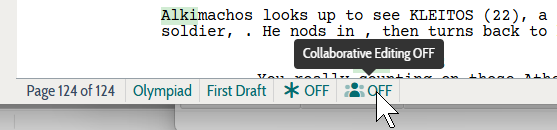
When you are editing a script, note that you can see, at a glance, if that draft is in Collaborative mode in the bottom bar at the bottom of the window:
File Menu Differences
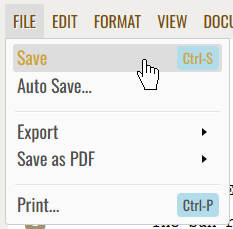
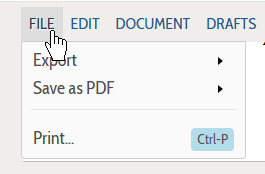
Additionally, the File menu will be different in Collaborative mode, with no Save or Autosave items. This should make sense because collaborative editing saves all changes immediately:
Loading screenplays…
Loading members…
Loading coverage…
Loading posts…
Education
Articles on the craft and business of screenwriting, from Script 360 and writers who know the work.
Loading articles…
Attachments/Media
The tabs in this section are currently hidden. Click on any of the tab titles above to open one.
| Title | Size | Uploaded | Actions |
|---|
No Attachments
No Images
No Videos
No Audio Files
Scripts
Attachments/Media
The tabs in this section are currently hidden. Click on any of the tab titles above to open one.
| Title | Size | Uploaded | Actions |
|---|
No Attachments
No Images
No Videos
No Audio Files