
Activity Log
Loading content...
Exporting Your Script
Save a Local Copy of your script
Export Your Script when Needed
While we store your script on our servers, saving a local copy on your computer is often necessary. This is especially important if you want to send your script to others or continue editing it in a different script editor such as Final Draft.
Final Draft (FDX) Files
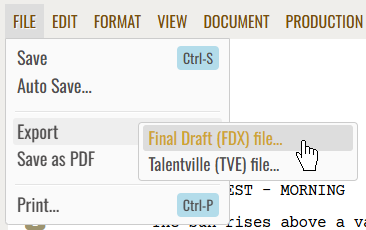
Every commercial script editor as well as other software geared toward film production can import Final Draft FDX files, so we created a comprehensive export to that format. To save a local Final Draft version of your script, simply choose the Export $rarr; Final Draft File option in the File menu:
Our Internal Format (TVE)
In addition, we also have our own file format you can use, even if this format is only usable (for now!) when using our editor. Choose the other Export option to save a local TVE file to your computer.
Saving as a PDF
This is explained in the following topic, be sure to give it a look!
Loading screenplays…
Loading members…
Loading coverage…
Loading posts…
Education
Articles on the craft and business of screenwriting, from Script 360 and writers who know the work.
Loading articles…
Attachments/Media
The tabs in this section are currently hidden. Click on any of the tab titles above to open one.
| Title | Size | Uploaded | Actions |
|---|
No Attachments
No Images
No Videos
No Audio Files
Series / World
For a TV series, or a film and its sequels: keep the characters and locations that recur here, and every script you add to the folder can bring them in.
The tabs in this section are currently hidden. Click on any of the tab titles above to open one.
Scripts
Attachments/Media
The tabs in this section are currently hidden. Click on any of the tab titles above to open one.
| Title | Size | Uploaded | Actions |
|---|
No Attachments
No Images
No Videos
No Audio Files