
Activity Log
Loading content...
Changes to Select All (Ctrl-A)
We made it a bit more sensible for screenwriters
We tweaked how Select All (Ctrl-A) works
For those of you conversant in computers, especially word processors, you probably know of the use of the Ctrl-A keyboard combination to select (i.e. highlight) the entire document.
In the Script 360 editor, we made a few changes to how it works:
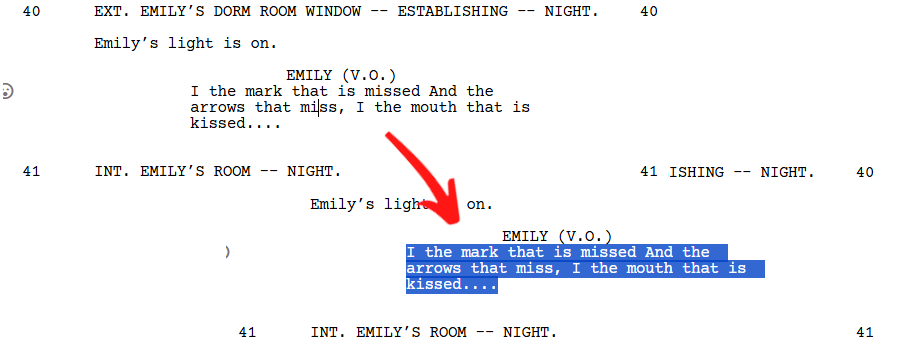
When you have a blinking cursor in a paragraph (or some text selected inside a single paragraph)...
Depressing Ctrl-A on your keyboard will select that paragraph:
If you depress Ctrl-A again, the entire scene is selected:
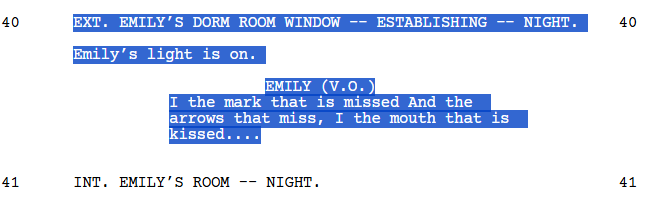
If you then again depress Ctrl-A, the editor will select the entire script (we'll skip that image here!).
Note that if you have a range of text selected that spans more than one paragraph, Ctrl-A will select the scene.
Also, if you have a selection range that spans multiple scenes, Ctrl-A will select all scenes from the start of the range to the end of the range.
So, the general sequence is...
- Ctrl-A the first time - Select Paragraph
- Ctrl-A the second time - Select Scene
- Ctrl-A the first time - Select Entire Script
Loading screenplays…
Loading members…
Loading coverage…
Loading posts…
Education
Articles on the craft and business of screenwriting, from Script 360 and writers who know the work.
Loading articles…
Attachments/Media
The tabs in this section are currently hidden. Click on any of the tab titles above to open one.
| Title | Size | Uploaded | Actions |
|---|
No Attachments
No Images
No Videos
No Audio Files
Series / World
For a TV series, or a film and its sequels: keep the characters and locations that recur here, and every script you add to the folder can bring them in.
The tabs in this section are currently hidden. Click on any of the tab titles above to open one.
Scripts
Attachments/Media
The tabs in this section are currently hidden. Click on any of the tab titles above to open one.
| Title | Size | Uploaded | Actions |
|---|
No Attachments
No Images
No Videos
No Audio Files