
Activity Log
Loading content...
Revised Text Display Options
You can decide what to show or hide
You decide what to show in the script
When you are editing your script, there are a number of settings you can choose that tells the editor what to show in the script:
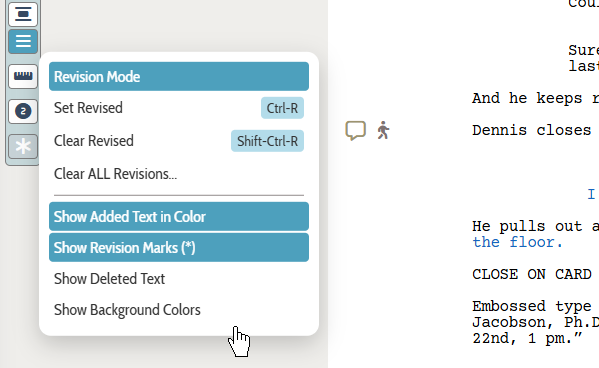
Show Added Text in Color
If this is on, all revised text (additions and deletions) will be shown using a specific color tied to who made the change. If you instead want revised text to be black like normal script text, turn this option off.
Show Revision Marks
If this is on, we will put an asterisk in the right margin where there is either added or deleted text.
Show Deleted Text
While we track both additions and deletions, it can become quite distracting to see everything you deleted shown in the script as striked-out text. Great for getting a full picture of what other editors have changed, but you will probably want to see deleted text selectivly.
If you turn off this option, deleted text will be there but hidden, and in that case will not adversely affect the script's pagination.
Show Background Colors
For revised text, we maintain both a text color and a lighter version to use as a background, which can make it quite easy to spot changes quickly. Should you want the background added to revised text, turn this option on.
Loading screenplays…
Loading members…
Loading coverage…
Loading posts…
Education
Articles on the craft and business of screenwriting, from Script 360 and writers who know the work.
Loading articles…
Attachments/Media
The tabs in this section are currently hidden. Click on any of the tab titles above to open one.
| Title | Size | Uploaded | Actions |
|---|
No Attachments
No Images
No Videos
No Audio Files
Series / World
For a TV series, or a film and its sequels: keep the characters and locations that recur here, and every script you add to the folder can bring them in.
The tabs in this section are currently hidden. Click on any of the tab titles above to open one.
Scripts
Attachments/Media
The tabs in this section are currently hidden. Click on any of the tab titles above to open one.
| Title | Size | Uploaded | Actions |
|---|
No Attachments
No Images
No Videos
No Audio Files